Why this exists
I wanted a fully bespoke audio-book reader where I wouldn’t be reliant on any particular service. This project was always made to be 0 cost. Additionally, I know that other audiobook services require you to purchase the books on their platform. I wanted this to be compatible with any book file that I may possess, making it readable. Besides functionality, my ultimate goal was to have a pleasant experience to read things aloud. I get more than enough screentime both through work and in leisure as well, so audio is a nice antidote to keep me off of screens just a little bit more.
What it does
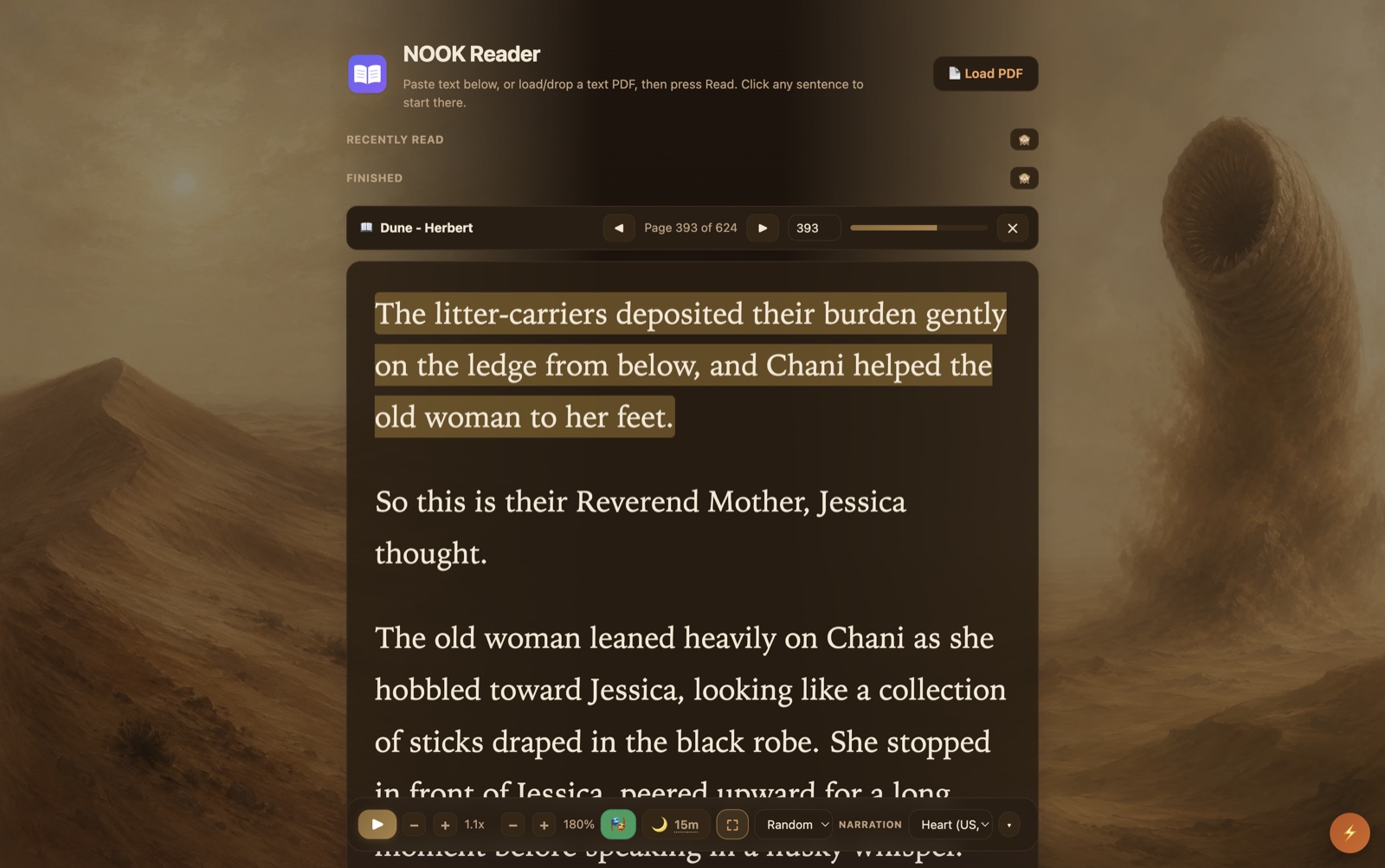
- Reads any web page, pasted text, or PDF aloud in a natural local neural voice. Offline and free after a one-time model download.
- Keeps a small library with Recently read and Finished shelves, and reopens each book to the exact sentence you left off on, highlighted in amber.
- Reads dialogue with a full cast: quoted speech gets alternating character voices, while narration and the “he said” tags stay in the narrator’s voice.
- Dresses each book in its own color theme, with AI-generated art painted into the left and right margins.
- A sleep timer that rewinds to the page you dozed off on, with an opt-in graceful Mac shutdown when it runs out.
- Turns any word into a flashcard with a definition and human-audio pronunciation, then syncs it into Anki and on to my phone.
- Answers the headphone and media keys, with a real macOS Now Playing entry.
- Reads Castilian Spanish as well as English, spoken correctly rather than spelled out.
How it works
- Pull the text. Web pages fall through site rules, then Readability, then a Gemini backstop, then raw body text, so something readable always comes out; PDFs are parsed page by page with a bundled PDF.js.
- Synthesize locally. Kokoro, an 82M-parameter neural voice, runs inside the browser through ONNX Runtime Web, on the GPU when there is one and on WASM when there isn’t, in the one extension context that has both audio and a GPU.
- Chunk, normalize, voice. Text is cut into whole sentences and normalized (years, currency, abbreviations) before the model speaks, and quoted dialogue is matched to speakers by plain string rules that only claim a name when it sits next to a word of speech.
- Remember the spot. Each book’s position is anchored to a stable character offset so it survives a voice change, with the heavy PDF bytes in IndexedDB and a light index in extension storage.
- Wear the art. A separate tool drives my own logged-in ChatGPT to generate the margin panels for each book, post-processes them locally, and deploys them to a Cloudflare Pages host the extension pulls from and caches offline.
- Reach past the browser. A small Python native host handles the graceful Mac shutdown when the sleep timer expires, and AnkiConnect carries saved words into the desktop app.
A few choices kept it honest. Everything runs locally, so there is no account and no per-book cost. The reader renders one page at a time, so a 600-page book never builds 600 pages of DOM. And the resume point is a character offset, not a page or a chunk number, so it stays correct even when a different voice reshapes the sentences.
What’s next
Truly, I am very satisfied with this project as it stands. There have been so many incremental improvements that I can barely remember them all. Every time there was an inkling for something that could be improved, it got done right there on the spot.
What I learned
This has by far been the most bespoke software that I’ve vibecoded. While it’s not extremely complex by nature, there were innumerable decisions around personal preferences that went into optimizing the UI and UX more than any LLM could on its own. It demonstrates to me that current frontier AI technology is capable of building just about anything a layperson would desire, but it can’t do it out of the box. The human in the loop still must remain diligent about the optimizations and decisions that fine-tune the software into something that you can really enjoy and be proud of.
Status
Shipped, and in daily use. I have gotten a lot of mileage on it already over this summer of 2026.